By Enterasource Posted on September 16, 2026
Read MoreUnderstanding RAID Storage: The Definitive Guide
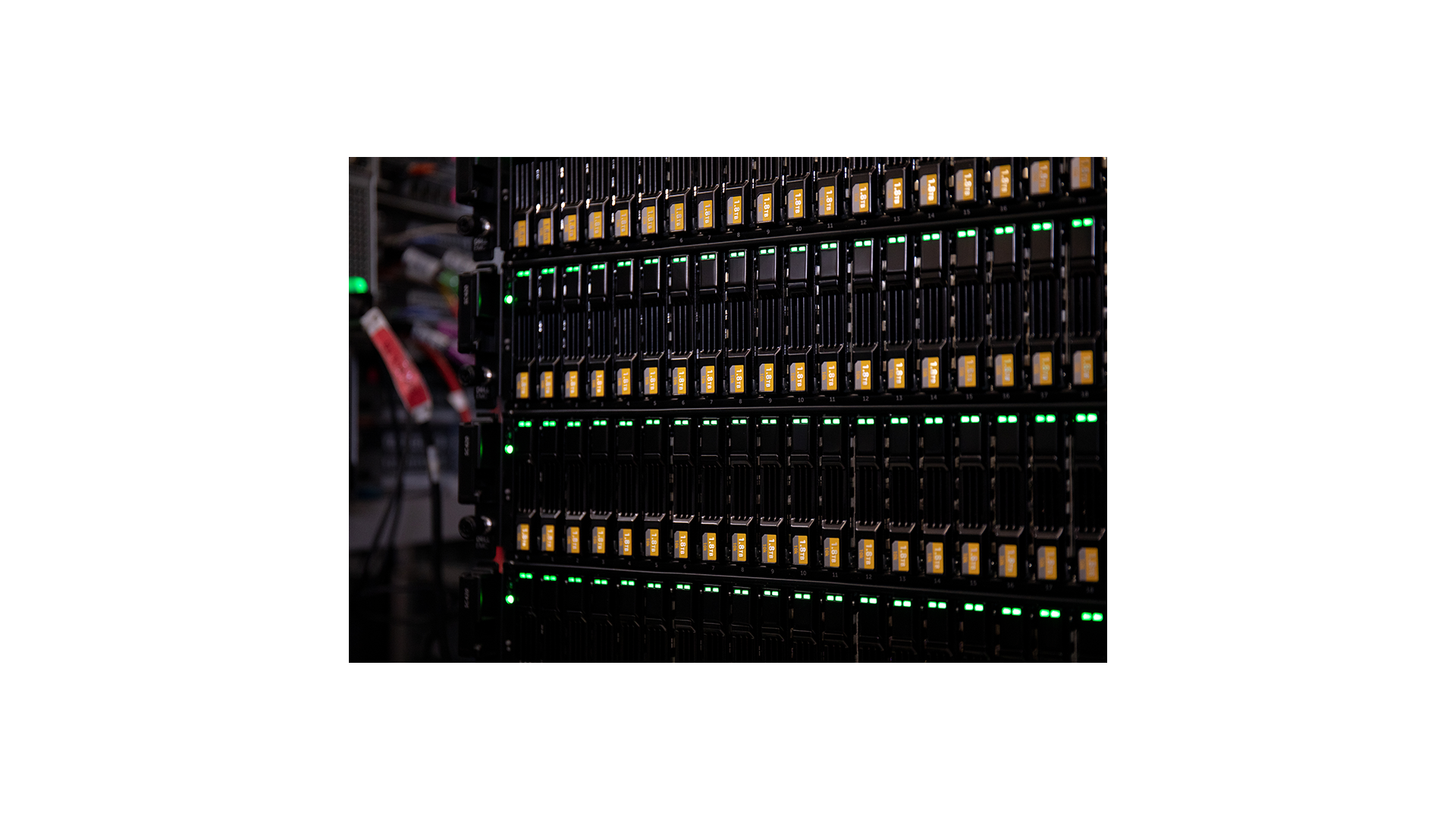
When it comes to data storage and protection, RAID (Redundant Array of Independent Disks) has become an essential technology for organizations of all sizes. In this comprehensive guide, we will explore what RAID storage is, its advantages, and the different RAID levels available. This will help you make an informed decision when selecting the most suitable RAID solution for your business or personal needs.
What is RAID Storage?
RAID stands for Redundant Array of Independent Disks, which is a technology that combines multiple physical hard drives into a single logical unit. This configuration enhances the performance, reliability, and storage capacity of a computer system. RAID achieves these improvements by employing various techniques such as disk striping, mirroring, and parity.
RAID can be implemented in hardware through a dedicated RAID controller or in software by the operating system. In enterprise servers such as the Dell PowerEdge R750, an integrated controller manages an array of enterprise hard drives or enterprise SSDs and presents them to the system as one resilient volume.
Why Use RAID Storage?
There are several reasons to consider implementing RAID storage in your organization or personal setup:
- Data Protection: RAID storage provides a level of redundancy, ensuring that your data remains safe in the event of a hard drive failure. This is especially critical for businesses that rely on the availability of their data to operate smoothly.
- Improved Performance: By distributing data across multiple drives, RAID can boost the read and write speeds of a storage system. This leads to increased performance, which is particularly beneficial for applications that require high-speed data access.
- Enhanced Storage Capacity: RAID storage allows you to combine the capacity of multiple hard drives, resulting in a more substantial overall storage space. This makes it easier to manage and store vast amounts of data.
RAID Levels at a Glance
The table below summarizes the most common RAID levels by minimum disk count, fault tolerance, usable capacity, and typical workload. In each formula, n is the number of drives in the array, and capacity assumes drives of equal size.
| RAID level | Min disks | Fault tolerance | Usable capacity | Read / Write | Typical use |
|---|---|---|---|---|---|
| RAID 0 (striping) | 2 | None | 100% (n) | Excellent / Excellent | Scratch space, caches, non-critical high-throughput data |
| RAID 1 (mirroring) | 2 | 1 drive | 50% (one drive) | Good / Good | Boot and OS volumes, small critical data sets |
| RAID 5 (single parity) | 3 | 1 drive | (n-1)/n | Good / Moderate | General-purpose file and application servers |
| RAID 6 (dual parity) | 4 | 2 drives | (n-2)/n | Good / Lower | Large-capacity arrays, archives, long rebuild windows |
| RAID 10 (1+0) | 4 | 1 per mirror pair | 50% (n/2) | Excellent / Very good | Databases and high-I/O transactional workloads |
The formulas above assume drives of equal size, and the capacity you actually end up with depends on how many drives you deploy and how large they are. Use our free RAID calculator to work out exact usable capacity, fault tolerance, and parity overhead for your own drive mix before you buy.
Two nested levels extend this set for very large arrays: RAID 50 stripes data across multiple RAID 5 sets (minimum six drives, tolerating one failure per sub-array), and RAID 60 stripes across multiple RAID 6 sets (minimum eight drives, tolerating two failures per sub-array). Both improve write throughput and rebuild behavior compared with a single wide parity group.
Different RAID Levels Explained
There are several RAID levels, each with its advantages and disadvantages. Here, we will provide an overview of the most commonly used RAID levels:
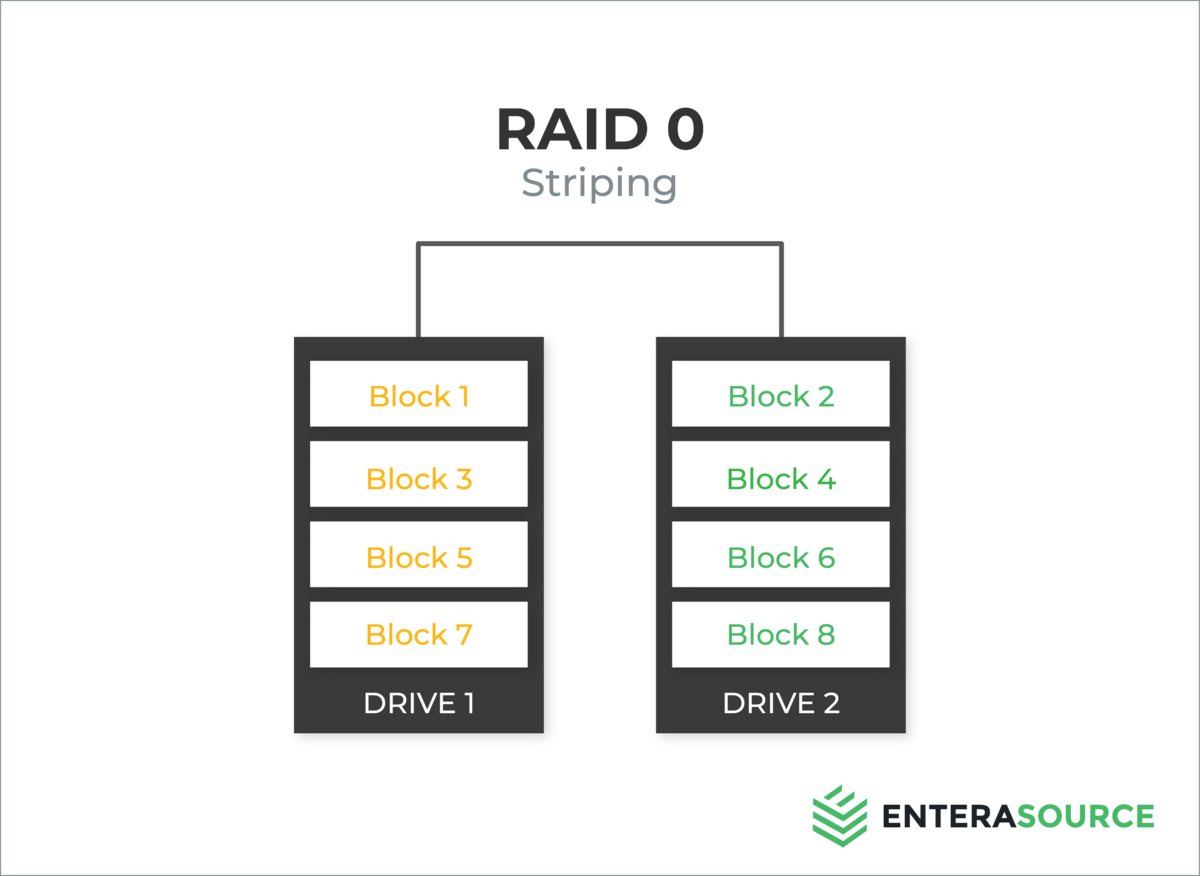
RAID 0 - Striping
RAID 0 employs a technique known as striping, which divides data into blocks and distributes them across multiple hard drives. This level improves performance by allowing parallel data access but does not provide any data redundancy. As a result, if one drive fails, all data stored on the RAID 0 array will be lost.
Minimum disks: 2. Fault tolerance: None; any single drive failure loses the entire array. Usable capacity: 100% of the combined drives (n times the smallest disk).
RAID 1 - Mirroring
RAID 1 uses mirroring, which entails duplicating data on two or more hard drives. This level offers data redundancy, as the same information is stored on multiple drives. If one drive fails, the data can still be accessed from the other drive(s). However, RAID 1 does not improve performance and is relatively expensive due to the additional storage required for mirroring.
Minimum disks: 2. Fault tolerance: 1 drive; the surviving mirror continues to serve data. Usable capacity: 50% (the size of a single drive).

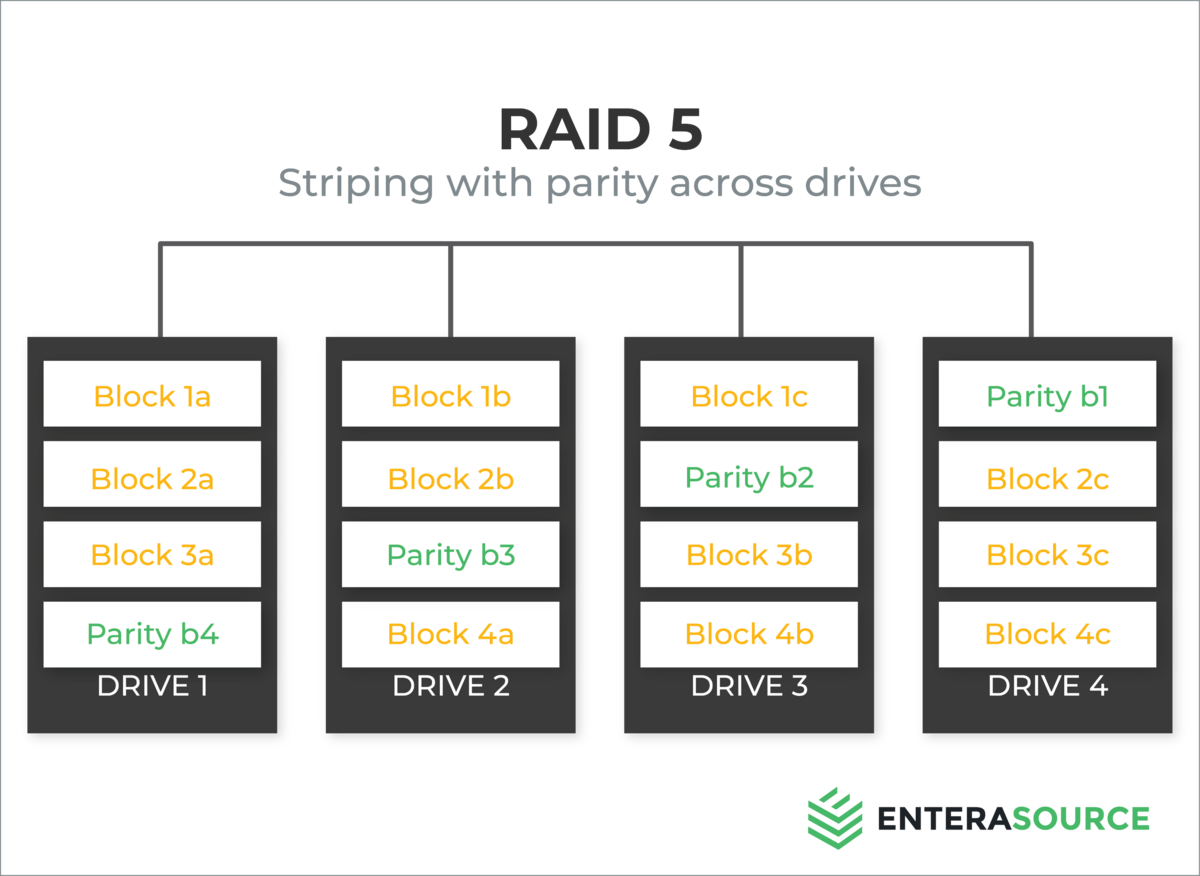
RAID 5 - Striping with Parity
RAID 5 combines striping and parity to provide both performance improvements and data redundancy. In this configuration, data blocks and parity information are distributed across three or more drives. If one drive fails, the missing data can be reconstructed using the parity information and the remaining drives. RAID 5 is a popular choice for organizations seeking a balance between performance, redundancy, and cost-effectiveness.
Minimum disks: 3. Fault tolerance: 1 drive. Usable capacity: (n-1)/n, or n-1 drives' worth, because one drive's capacity is consumed by parity.
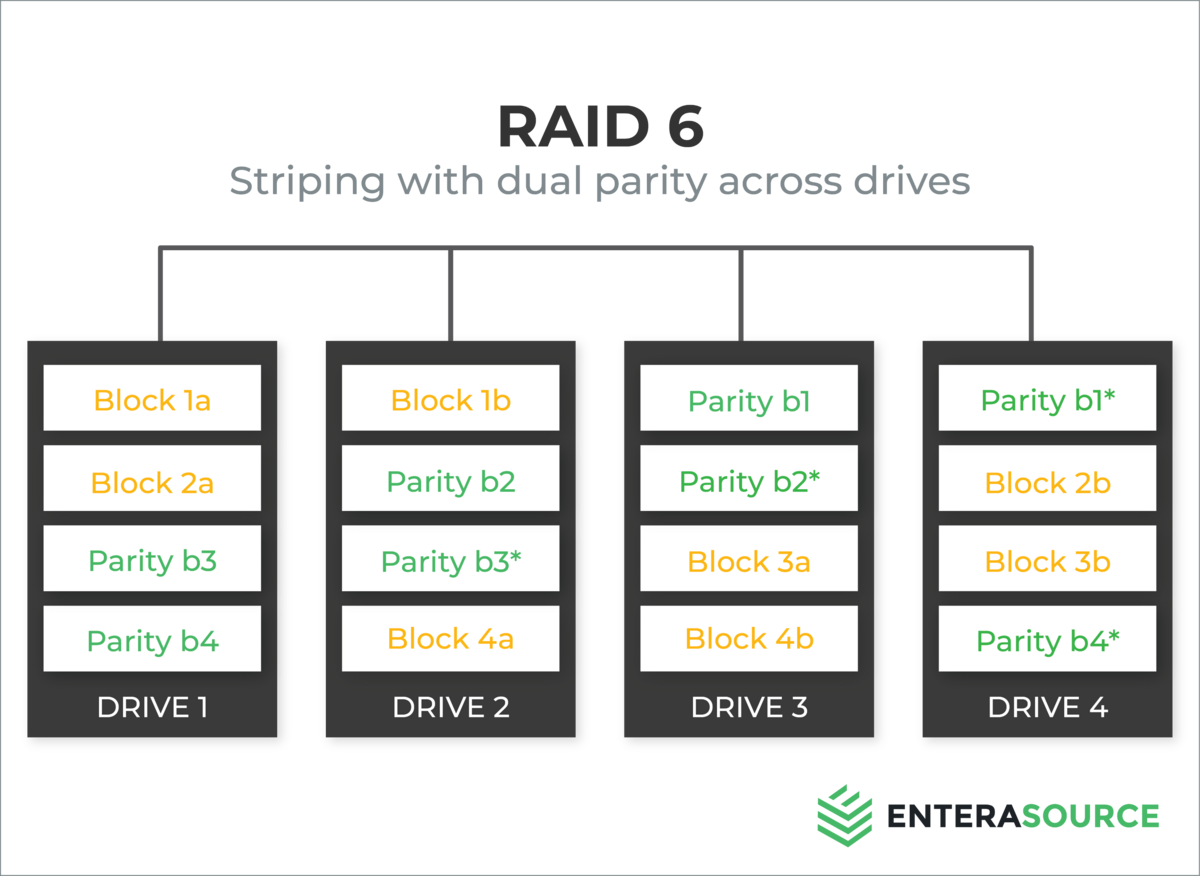
RAID 6 - Striping with Double Parity
RAID 6 is similar to RAID 5 but uses double parity for added data protection. This level can tolerate the failure of two drives simultaneously, ensuring higher reliability than RAID 5. However, RAID 6 requires a minimum of four drives and may have slightly reduced performance compared to RAID 5 due to the additional parity calculations. Nevertheless, RAID 6 is an excellent choice for organizations that prioritize data protection and can afford the increased storage requirements.
Minimum disks: 4. Fault tolerance: 2 drives simultaneously. Usable capacity: (n-2)/n, or n-2 drives' worth, because two drives' capacity is consumed by dual parity.
RAID 10 (1+0) - Striping and Mirroring
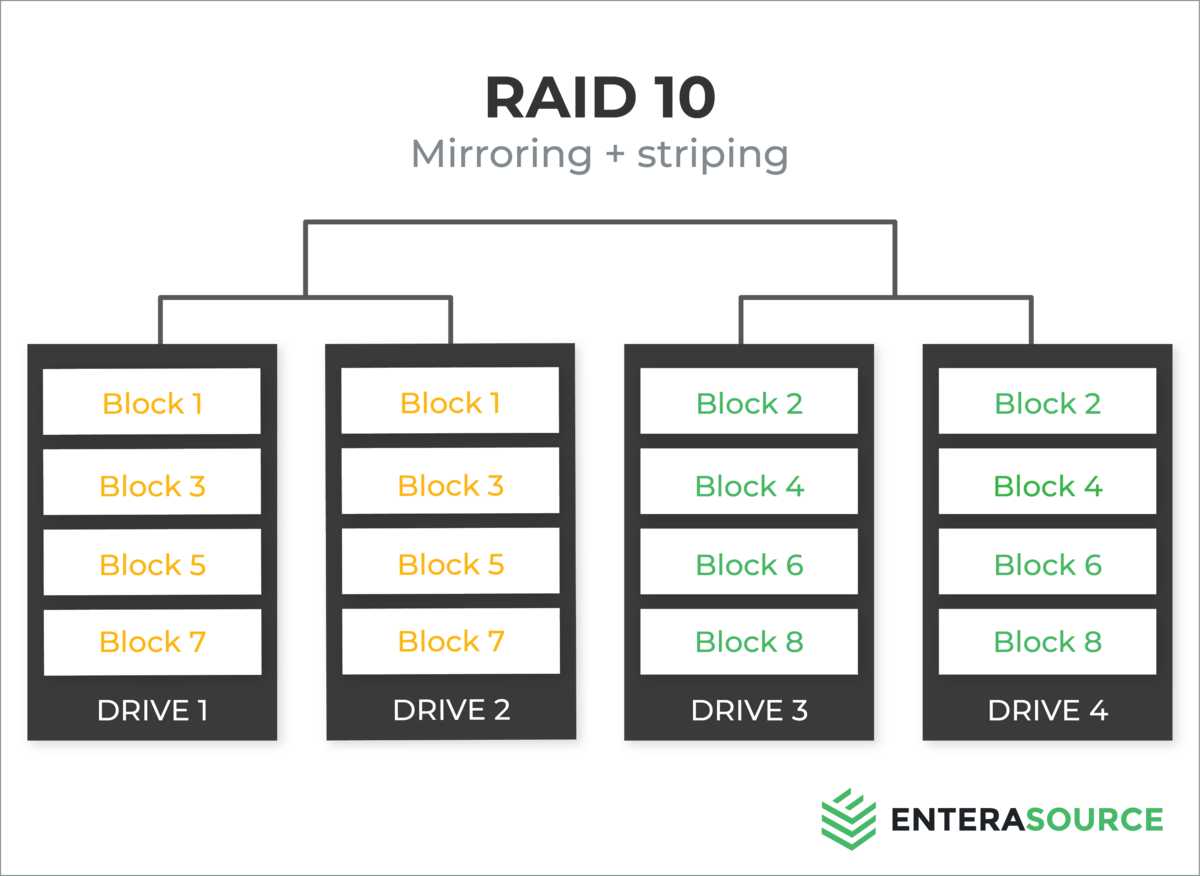
RAID 10, also known as RAID 1+0, is a combination of RAID 1 (mirroring) and RAID 0 (striping). In this configuration, data is mirrored across pairs of drives and then striped across the mirrored sets. RAID 10 provides both high performance and redundancy, making it an ideal solution for applications that require fast data access and robust data protection. However, RAID 10 can be expensive due to the need for at least four drives and the additional storage required for mirroring.
Minimum disks: 4 (an even number). Fault tolerance: at least 1 drive, and up to one per mirrored pair. Usable capacity: 50% (n/2).
Selecting the Right RAID Level
Choosing the most suitable RAID level for your needs depends on various factors, including performance requirements, data protection needs, and budget constraints. Here are some general guidelines to help you make an informed decision:
- RAID 0: Best for non-critical applications that prioritize performance over data protection.
- RAID 1: Suitable for small-scale setups that require data redundancy but do not have high performance requirements.
- RAID 5: An ideal choice for businesses seeking a balance between performance, redundancy, and cost-effectiveness.
- RAID 6: Recommended for organizations that prioritize data protection and can afford the increased storage requirements.
- RAID 10: Best suited for applications that demand both high performance and robust data protection, provided the budget allows for the additional storage costs.
In conclusion, RAID storage is a vital technology for enhancing performance, ensuring data protection, and increasing storage capacity in various computing environments. By understanding the different RAID levels and their respective advantages and disadvantages, you can make an informed decision about the most appropriate RAID solution for your organization or personal needs. As technology continues to evolve, RAID storage will remain a crucial component in the ever-growing landscape of data management and protection.
Frequently Asked Questions
What is RAID?
RAID, short for Redundant Array of Independent Disks, is a technology that combines multiple physical drives into a single logical unit to improve performance, redundancy, or both. Different RAID levels use striping, mirroring, and parity in different combinations to balance speed, fault tolerance, and usable capacity.
Which RAID level is best?
There is no single best RAID level; the right choice depends on your priorities. RAID 10 is preferred for high-I/O databases that need both speed and redundancy. RAID 5 balances usable capacity and protection for general-purpose servers. RAID 6 suits large-capacity arrays where long rebuild times make dual-drive protection worthwhile. RAID 1 is common for boot volumes, and RAID 0 is reserved for non-critical data where raw speed matters and redundancy is not required.
What is the difference between RAID 5 and RAID 6?
Both stripe data with distributed parity, but RAID 5 uses a single parity block and tolerates one drive failure, giving usable capacity of n-1 drives. RAID 6 uses dual parity and tolerates two simultaneous failures, giving usable capacity of n-2 drives. RAID 6 trades a little write performance and one more drive of capacity for surviving a second failure, which matters on large arrays where rebuilds take a long time and a second drive can fail before the first rebuild finishes. RAID 5 needs at least three drives; RAID 6 needs at least four.
RAID 10 vs RAID 5: which should you choose?
RAID 10 mirrors and then stripes, delivering excellent read and write performance with no parity calculation, and it rebuilds quickly by copying from a surviving mirror; the trade-off is that only about half of the raw capacity is usable. RAID 5 delivers more usable capacity, at n-1 drives, and a lower cost per usable terabyte, but parity overhead reduces write performance and rebuilds are slower and harder on the array. Choose RAID 10 for write-heavy databases and virtualization, and choose RAID 5 when usable capacity and cost efficiency matter more than peak write speed.
Have Questions About This Topic?
Our team works with enterprise IT hardware daily. If this article raised questions about your specific environment, we are happy to help.