Dell EqualLogic Controllers
An EqualLogic controller is chosen by its type number: Dell assigns each control module type to specific PS Series arrays, and its PS6210 and PS6610 manuals say not to mix control module types in one array. Dell's control modules run from Type 7 to Type 19 across the PS6000 and PS6500, PS4000, PS4100, PS6100, PS4110, PS6110, PS4210, PS6210 and PS6610, with 1GBASE-T iSCSI ports on the older types and 10Gb SFP+ or 10GBASE-T ports on the rest. Read the type from the label on the module you are replacing and match it; each controller is tested in-house.
-
 Dell 5PM3C EqualLogic PS6000 PS6500 Type 7 1GBASE-T iSCSI 2GB Cache ControllerAvailability: Available by QuoteManufacturer: Dell Condition: Refurbished 1 Year WarrantyRequest PricingOut of stock
- Dell N789R EqualLogic PS4000 Type 8 1GBASE-T iSCSI 2GB Cache ControllerAvailability: In StockManufacturer: Dell Condition: Refurbished 1 Year WarrantyRequest PricingOut of stock
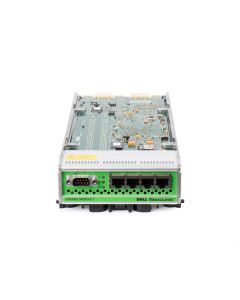


EqualLogic control module types and the arrays they fit
Dell's PS Series Configuration Guide ties each control module type to its arrays, network ports and cache; the 16GB and 8GB figures for Types 15, 18 and 19 come from the PS6210, PS6610 and PS4210 owner's manuals.
| Type | PS Series arrays | iSCSI ports per controller | Cache or memory per controller |
|---|---|---|---|
| Type 7 | PS6000, PS6500 | 4 x 1GBASE-T | 2GB |
| Type 8 | PS4000 | 2 x 1GBASE-T, plus a 10/100 management port | 2GB |
| Type 11 | PS6100 | 4 x 1GBASE-T, plus management | 4GB |
| Type 12 | PS4100 | 2 x 1GBASE-T, plus management | 4GB |
| Type 14 | PS6110 | 1 x 10Gb, SFP+ or 10GBASE-T, one in use at a time | 4GB |
| Type 17 | PS4110 | 1 x 10Gb, SFP+ or 10GBASE-T, one in use at a time | 4GB |
| Type 15 | PS6210 | 2 x 10Gb, each SFP+ or 10GBASE-T | 16GB |
| Type 19 | PS4210 | 2 x 10Gb, each SFP+ or 10GBASE-T | 8GB |
| Type 18 | PS6610 | 2 x 10Gb, each SFP+ or 10GBASE-T | 16GB |
Active and secondary control modules
Only one control module in a PS Series array is active at a time. Dell's PS6210 manual describes the secondary module mirroring the cache of the active one and taking over automatically if the active module fails. It also covers vertical failover, where an Ethernet port on the active module fails over to the same port on the secondary when a network path fails, and notes that the management ports do not fail over.
Replacing one control module
A control module can be installed without shutting the array down, and Dell's manuals keep the swap rules short. Replace a module only with one of the same type and color, run both modules on the same firmware version or only one will be functional, and move the microSD card from the failed module into the replacement so the array keeps its firmware. A PS array can run on one control module, but Dell calls that a single point of failure, so a failed module is worth replacing promptly.
Batteries for PS4210, PS6210 and PS6610 control modules are covered on Batteries, drives on EqualLogic Hard Drives and EqualLogic SSDs, and complete systems on Dell EqualLogic PS Series arrays.