

By Enterasource Posted on October 7, 2026
Read MoreSSD Endurance Explained: DWPD vs TBW and How Much You Actually Need

SSD Endurance Explained: DWPD vs TBW and How Much You Actually Need
Every enterprise SSD spec sheet leads with two endurance numbers — DWPD and TBW — and buyers routinely overpay for one or under-spec the other. We receive, test, and warranty these drives every day across Dell PowerEdge, HPE ProLiant, and Supermicro builds, so this guide is the practical version: what the ratings mean, how to convert between them, and how to match a drive's write endurance to the workload it will actually run.
DWPD (drive writes per day) is the number of times an SSD's full capacity can be overwritten every day for its warranty period — usually five years — while still meeting its endurance spec. TBW (terabytes written) is the same promise expressed as a lifetime total. Get the relationship between them right and you stop guessing about SSD lifespan.
If you already know your workload class, skip to our enterprise SSDs. If you're still deciding, start here.
What Is DWPD?
DWPD stands for drive writes per day. A drive rated at 1 DWPD can have its entire usable capacity written once per day, every day, for the length of its warranty. A 3.84 TB drive at 1 DWPD tolerates 3.84 TB of host writes daily for five years; the same drive at 3 DWPD tolerates 11.52 TB per day.
The number is a warranty commitment, not a description of your traffic. Kioxia states it plainly: one full drive write per day means the drive "can be written and re-written to full capacity once a day every day under the specified workload for the specified lifetime." That specified workload matters — enterprise DWPD is measured under the JEDEC JESD219 random-write pattern at data-center temperatures, which is harsher than most real workloads. Your drive will usually see less wear than the sticker implies, but a pure random-write database can push right up against it.
What Is TBW?
TBW stands for terabytes written — the total amount of host data an SSD is warranted to absorb over its life before the endurance rating is used up. Per JEDEC JESD218, the TBW rating is the number of terabytes that can be written "while still meeting" the drive's requirements for uncorrectable errors, failure rate, and data retention.
TBW is the easier number to reason about when comparing drives of different capacities, because it's an absolute. A "tbw ssd" figure of 7,008 TBW tells you exactly how many terabytes the warranty covers, regardless of how you slice it per day. It is also a limit, not a cliff: drives frequently keep working past their rated TBW, but once you cross it the warranty and the JEDEC data-retention guarantees lapse — not where you want a production array.
DWPD vs TBW: How the Two Ratings Relate

DWPD and TBW are the same endurance measured two ways, tied together by capacity and warranty length:
TBW  = DWPD × capacity_TB × 365 × warranty_years
DWPD = TBW ÷ (capacity_TB × 365 × warranty_years)
For the standard five-year enterprise warranty, 365 × 5 = 1,825, so TBW is just DWPD × capacity × 1,825. One unit note that trips people up: manufacturers rate both capacity and TBW in decimal terabytes (1 TB = 1,000 GB), so the two divide cleanly with no 1024 factor. That's why a Kioxia CM6-R at 3.84 TB and 1 DWPD is rated at exactly 7,008 TBW: 3.84 × 1,825 = 7,008. If a conversion forces in a ×1024, it's mixing binary and decimal units — skip it.
Because the two are locked together, the practical answer to "dwpd vs tbw, which matters" is: use DWPD to judge write intensity relative to a drive's size, and use TBW to compare total lifetime writes across drives of different capacities. Buy on DWPD to match the workload; verify with TBW that the lifetime number covers your daily writes.
DWPD-to-TBW conversion table (5-year warranty)
The lookup below is computed straight from the formula for common enterprise capacities. Values are decimal TB; where a datasheet rounds (some vendors publish 7,000 for the exact 7,008), the difference is rounding, not a different drive.
| Usable capacity | 1 DWPD → TBW | 3 DWPD → TBW | 10 DWPD → TBW |
|---|---|---|---|
| 480 GB | 876 TBW | 2,628 TBW | 8,760 TBW |
| 960 GB | 1,752 TBW | 5,256 TBW | 17,520 TBW |
| 1.92 TB | 3,504 TBW | 10,512 TBW | 35,040 TBW |
| 3.84 TB | 7,008 TBW | 21,024 TBW | 70,080 TBW |
| 7.68 TB | 14,016 TBW | 42,048 TBW | 140,160 TBW |
| 15.36 TB | 28,032 TBW | 84,096 TBW | 280,320 TBW |
How to Calculate DWPD
Two worked examples cover almost every situation:
From DWPD to TBW. You're told a 3.84 TB drive is rated 1 DWPD over five years. Multiply: 1 × 3.84 × 365 × 5 = 7,008 TBW. That's your lifetime write budget.
From TBW to DWPD. You're comparing a drive that advertises 17,520 TBW at 3.2 TB over five years, and you want its intensity rating. Divide: 17,520 ÷ (3.2 × 365 × 5) = 3.0 DWPD. Now it lines up against every other drive on a per-capacity basis.
If a vendor gives you TBW at one capacity but not another in the same family, don't assume the DWPD is identical — it usually is within a family, but the top capacity is often slightly lower (you'll see a "3 DWPD" line where the biggest drive is really 2.8). Always run the math on the exact capacity you're buying.
What Affects SSD Endurance
Endurance isn't one number handed down from the flash gods — it's the product of several design choices. Four matter most.
NAND cell type
The single biggest lever is how many bits each flash cell stores. More bits mean more voltage levels packed into the same window, tighter error margins, and fewer program/erase (P/E) cycles before the cell wears out. These are typical rated ranges — they vary by process node and vendor, so treat them as ranges, not gospel:
| NAND type | Bits per cell | Typical rated P/E cycles |
|---|---|---|
| SLC | 1 | ~50,000–100,000 |
| MLC | 2 | ~3,000–10,000 |
| TLC | 3 | ~1,000–3,000 |
| QLC | 4 | ~100–1,000 |
Every mainstream enterprise NVMe drive worth buying today uses 3D TLC — the sweet spot of density and endurance. QLC shows up in read-optimized, high-capacity tiers; it is not a write-workload flash. Some industrial drives run TLC in a one-bit "pSLC" mode to reach roughly 30,000 P/E cycles, trading three-quarters of the capacity for endurance.
Write amplification
Flash erases in large blocks but writes in smaller pages, so the controller ends up writing more to the NAND than the host asked for. That ratio is the write amplification factor (WAF), and it's always above 1. Small random writes drive WAF up; large sequential writes keep it near 1. This is why two "same DWPD" drives can wear at very different rates on your specific traffic, and why the SMART "host writes" figure never equals the wear the drive actually records.
Over-provisioning
Enterprise drives reserve spare NAND the host can't touch, used by the controller for garbage collection, wear leveling, and bad-block replacement. More of this reserve — the drive's over-provisioning — lowers write amplification and raises endurance. It's the reason one physical drive can ship as two SKUs — a 1 DWPD model and a 3 DWPD model built from identical flash, where the higher-endurance version simply hands more capacity to the controller and shows you less usable space.
Temperature and workload pattern
JEDEC's endurance and retention ratings assume a data-center thermal profile (55 °C active). Run hotter and both wear and powered-off data retention degrade. And because endurance is rated under a random-write workload, a drive doing mostly sequential writes — video capture, backup streams — typically outlives its rated TBW, while a pure random OLTP load approaches it.
Matching DWPD to Your Workload
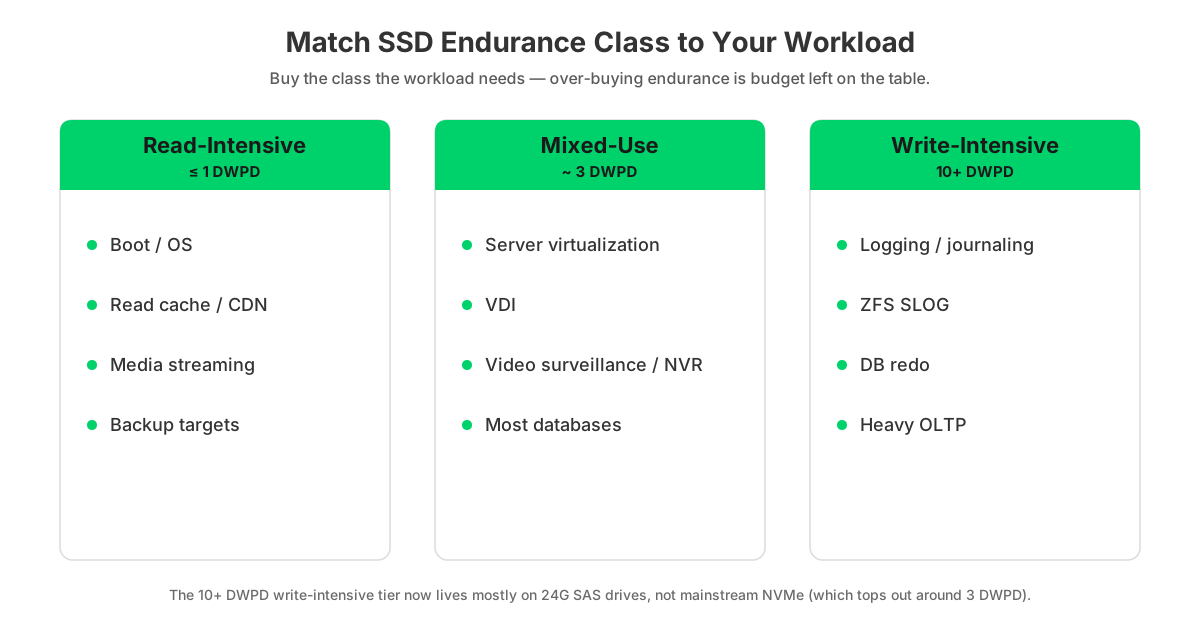
Vendors sort enterprise SSDs into three endurance classes, and matching the class to the workload is where you save money without risking the array. Read-intensive drives run about 1 DWPD, mixed-use about 3 DWPD, and write-intensive about 10 DWPD. For a deeper treatment of the three classes, see our read-intensive, mixed-use, and write-intensive SSDs guide.
| Workload | Write character | Recommended class | Typical DWPD |
|---|---|---|---|
| Boot / OS / hypervisor | Very low, mostly read | Read-Intensive | ≤1 |
| Read caching / CDN / media streaming | Read-dominant | Read-Intensive | ≤1 |
| Backup / archive targets | Sequential, moderate | Read-Intensive → Mixed-Use | ≤1–3 |
| Video surveillance / NVR | Sustained sequential write | Mixed-Use | ~3 |
| General server virtualization | Mixed read/write | Mixed-Use | 3 |
| VDI | Bursty mixed | Mixed-Use | 1–3 |
| OLTP / transactional databases | Random write-heavy | Mixed-Use → Write-Intensive | 3–10 |
| Logging / journaling / ZFS SLOG / DB redo | Constant small random writes | Write-Intensive | 10+ |
One caveat worth knowing before you shop: the 10-DWPD write-intensive tier now lives mostly on 24G SAS drives rather than mainstream PCIe NVMe, which tops out around 3 DWPD. If your write load genuinely needs 10 DWPD, plan on a SAS write-intensive drive (or storage-class memory like Optane), not an off-the-shelf NVMe part.
Real Enterprise SSD Endurance, Compared

Here's where generic explainers stop and our stock room starts. Below are enterprise drives we actually carry — listed by their OEM model, which we stock Dell-branded (the Dell part number is the SKU; the Kioxia, Samsung, Intel, or Micron model appears in the product name). Every DWPD and TBW figure is the vendor's own datasheet number.
| Drive (we stock Dell-branded) | Class | Capacity | DWPD | TBW (5-yr) | Interface |
|---|---|---|---|---|---|
| Kioxia CM6-R | Read-Intensive | 3.84 TB | 1 | 7,008 TBW | PCIe 4.0 NVMe (2.5") |
| Micron 7450 PRO | Read-Intensive | 3.84 TB | 1 | 7,000 TBW | PCIe 4.0 NVMe (M.2) |
| Intel/Solidigm P4510 | Read-Intensive | 4 TB | ~0.85 | 6,300 TBW (6.3 PBW) | PCIe 3.0 NVMe (2.5") |
| Kioxia CM6-V | Mixed-Use | 1.6 TB | 3 | 8,760 TBW | PCIe 4.0 NVMe (2.5") |
| Kioxia PM7-V | Mixed-Use | 1.6 TB | 3 | 8,760 TBW | 24G SAS (2.5") |
| Intel/Solidigm P4610 | Mixed-Use | 3.2 TB | ~3.7 | 21,800 TBW (21.8 PBW) | PCIe 3.0 NVMe (2.5") |
| Samsung PM1725a | Mixed-Use (high) | 1.6 TB | 5 | 14,600 TBW | PCIe 3.0 NVMe (2.5"/HHHL) |
| Kioxia PM6-M | Write-Intensive | 1.6 TB | 10 | 29,200 TBW | 24G SAS (2.5") |
| Intel Optane P4800X | Extreme write | 1.5 TB | 60 | 164,000 TBW (164 PBW) | PCIe 3.0 3D XPoint (add-in) |
Datasheet sources: Kioxia CM6-R, CM6-V, Micron 7450 PRO, Intel P4510, P4610, Samsung PM1725a, Kioxia PM7-V, PM6-M, and Intel Optane P4800X.
Two pairs on that list teach the whole lesson. The Kioxia CM6-R and CM6-V are the same NVMe platform — the CM6-R is read-intensive at 1 DWPD, the CM6-V is mixed-use at 3 DWPD, the difference being over-provisioning, not different flash. Same story with the Intel P4510 (read-intensive, ~0.85 DWPD) and P4610 (mixed-use, ~3.7 DWPD): one design, two endurance grades. And the Optane P4800X shows the ceiling — 60 DWPD, 164 PBW — using 3D XPoint rather than NAND, which is why it's reserved for write-caching and logging tiers where nothing else survives.
Notice what the table is built around: capacity, class, interface, and endurance — not price. Most of these are configure-and-quote drives, so browse enterprise NVMe SSDs and request a quote on the exact model and capacity you need.
How to Measure Your SSD's Actual DWPD
You don't have to trust the label — you can read what a drive has actually done from its SMART data and compute its observed DWPD:
Observed DWPD = host_TB_written ÷ capacity_TB ÷ (power_on_hours ÷ 24)
On NVMe drives, run smartctl -a /dev/nvme0 (or nvme smart-log /dev/nvme0). Read Data Units Written — reported in units of 1,000 × 512 bytes, so each unit is 512,000 bytes — and Percentage Used, the endurance consumed (it can exceed 100% once the rated TBW is passed). Available Spare versus its threshold tells you how much reserve NAND is left.
On SATA drives, the equivalent attributes are Total_LBAs_Written (multiply by 512 bytes) and Media_Wearout_Indicator, a normalized counter that starts at 100 and counts down.
Worked example. A drive reports Data Units Written = 4,000,000,000. Multiply by 512,000 bytes and you get 2.048 × 10¹⁵ bytes, or 2,048 TB written. On a 3.84 TB drive that's been powered on 24,000 hours (1,000 days): 2,048 ÷ 3.84 ÷ 1,000 = 0.53 observed DWPD — comfortably inside a 1-DWPD rating, with headroom to spare.
On Dell PowerEdge, you don't even need OS access: iDRAC exposes Remaining Rated Write Endurance per drive as a 0–100% value (100% = fresh), and can alert you by email or SNMP when a drive drops below a threshold you set.
Checking Endurance on Refurbished Enterprise SSDs
This is the check most buyers skip and we never do. Before any refurbished enterprise SSD ships, its consumed-endurance telemetry gets read — a 30-second SMART check that tells you exactly how much SSD lifespan is left. It's also the check you should run on anything arriving from a secondary source.
| Metric | Where to read it | Healthy (deploy) | Reject |
|---|---|---|---|
| NVMe Percentage Used | smartctl / nvme smart-log | Low; ideally under ~10% for near-new | At or over 100% |
| Dell Remaining Rated Write Endurance | iDRAC / OpenManage | Over ~90% remaining | Near 0% |
| SATA Media Wearout Indicator | smartctl (normalized) | Near 100 | At or near its threshold |
| Available Spare vs threshold | smartctl (NVMe) | Well above threshold | At or below threshold |
| Media / data-integrity errors, reallocated blocks | smartctl | Zero and not growing | Growing |
A used enterprise drive with low Percentage Used often has thousands of TBW of rated life remaining — a 3.84 TB read-intensive drive at 10% used still has roughly 6,300 of its 7,008 TBW left. That's the case for buying quality refurbished enterprise SSDs instead of new: the endurance is verifiable, and it's mostly intact. Cross-check the host-written total against the drive's rated TBW from the table above and you know precisely what you're deploying.
How Much DWPD Do You Actually Need?
Less than the spec sheets nudge you toward, usually. In practice, most of the general-purpose and read-heavy server workloads we handle run comfortably under 1 DWPD — a useful reality check against reflexively buying mixed-use or write-intensive drives "to be safe." The honest, vendor-neutral answer is that you should size to measured writes, not to a feeling.
The method is simple: pull observed DWPD from a comparable existing drive using the SMART method above, add headroom for growth, and pick the class that covers it. Boot volumes, read caches, CDNs, and most virtualization run happily on read-intensive drives. Reach for mixed-use when a workload is genuinely write-heavy — busy transactional databases, write-logging, VDI at scale. Save write-intensive and Optane for the narrow set of jobs (journaling, ZFS SLOG, heavy OLTP redo) that actually justify them. Over-buying endurance you'll never consume is just capacity and budget left on the table.
Frequently Asked Questions
- What does DWPD stand for, and what is it?
- DWPD stands for drive writes per day. It's how many times an SSD's full usable capacity can be overwritten daily, every day, for its warranty term (usually five years), while still meeting its endurance spec. A 3.84 TB drive at 1 DWPD tolerates 3.84 TB of writes per day.
- What is a good DWPD?
- It depends on the workload, not a universal number. Read-intensive uses (boot, cache, CDN, backup) are fine at 1 DWPD or less; general virtualization and most databases want about 3 DWPD; constant logging or journaling wants 10 DWPD. Over-buying endurance you'll never use just wastes budget.
- Is 0.1 DWPD good for an SSD?
- 0.1 DWPD is a low, consumer or read-archival rating — on a 1 TB drive over five years that's only about 183 TBW. It's fine for boot or cold storage but under-specced for data-center write workloads. Enterprise read-intensive drives start around 1 DWPD, roughly ten times more.
- DWPD vs TBW — which one matters?
- They're the same endurance expressed two ways: TBW = DWPD × capacity × 365 × warranty years. Use DWPD to match write intensity to your workload; use TBW to compare total lifetime writes across drives of different capacities. For buying, match DWPD first, then confirm TBW covers your daily writes.
- How do I calculate DWPD?
- Divide the drive's TBW by its capacity, days, and warranty years: DWPD = TBW ÷ (capacity_TB × 365 × warranty_years). Example: 7,008 TBW ÷ (3.84 TB × 365 × 5) = 1.0 DWPD. Reverse the formula to get TBW from a DWPD rating.
- How do I measure my SSD's actual DWPD?
- Read SMART data. On NVMe, smartctl -a /dev/nvme0 gives "Data Units Written" (each unit is 512,000 bytes) and power-on hours. Then observed DWPD = host TB written ÷ capacity TB ÷ (power-on hours ÷ 24). On Dell PowerEdge, iDRAC shows Remaining Rated Write Endurance directly.
- What DWPD do I need for a database?
- Transactional (OLTP) databases are random-write-heavy — plan on 3 DWPD (mixed-use) minimum, moving to 10 DWPD (write-intensive) for busy write logs, redo, or ZFS SLOG devices. Read-mostly analytics databases run fine on 1 DWPD read-intensive drives.
- What DWPD do I need for VDI?
- VDI is bursty mixed I/O — boot storms plus steady user writes. A 3 DWPD mixed-use drive is the safe general choice; large deployments with lighter write churn can run 1 DWPD read-intensive, but size to your measured writes per day, not seat count alone.
- What DWPD do I need for video surveillance?
- Video surveillance and NVR are sustained sequential writes, which are gentler on NAND than random writes but continuous. A 3 DWPD mixed-use drive is the standard fit. Confirm the camera write rate keeps daily writes inside the drive's TBW over your retention window.
- Can I safely buy a refurbished enterprise SSD?
- Yes, if you check consumed endurance first. Read NVMe "Percentage Used" (want it low, under about 10% for near-new) or Dell iDRAC "Remaining Rated Write Endurance" (want it high), plus available spare and error counts. A lightly used enterprise drive often has thousands of TBW of rated life left.
Know your workload class and want the right drive without the guesswork? Browse our enterprise SSDs by interface and endurance class, or send us the workload and capacity and we'll spec it — request a quote on the exact model that fits.
Have Questions About This Topic?
Our team works with enterprise IT hardware daily. If this article raised questions about your specific environment, we are happy to help.
