


By Enterasource Posted on October 7, 2026
Read MoreDell PowerEdge R740 & R740xd Backplane and Storage Configuration Guide

Dell PowerEdge R740 & R740xd Backplane and Storage Configuration Guide
The short answer: the Dell R740xd backplane that supports NVMe is either the 24-bay hybrid board (Dell part K2Y8N / expansion board 58D2W), which runs SAS, SATA, and up to 12 NVMe drives, or the dedicated 24-bay all-NVMe board (Dell part FJH5T, also listed as FHJ5T / expansion board 01YX3), which runs all 24 bays as NVMe. Neither one runs NVMe on its own — you also need a PCIe expander card and the cable that connects it to the backplane.
The R740 backplane is the board behind your drive bays. It decides which drive interfaces the chassis can run, how many, and which RAID controller you can pair. On the R740 and R740xd it is the single most misunderstood part of the machine: it's why a SAS SSD "won't initialize," why NVMe drives never show up in the RAID BIOS, and why a 24-bay chassis sometimes only takes SATA. This guide lays out every supported configuration, the Dell part numbers, and how to spec (or upgrade) it correctly. We receive, test, and warranty these exact backplane, controller, and cable combinations, so the part numbers here are the ones we physically handle — not a copy of a datasheet.
R740 vs R740xd drive-bay configurations
The R740 and R740xd are not the same storage platform. The R740 is a general-purpose 2U server that tops out at 16 front drives. The R740xd is the storage-dense sibling: same 14th-gen platform and CPUs, but a chassis engineered for front, middle, and rear drives — up to 32 SAS/SATA or up to 24 NVMe.
| Chassis | Front bays | Mid tray | Rear cage | Max drives | Interfaces |
|---|---|---|---|---|---|
| R740 | 8×3.5", 8×2.5", or 16×2.5" | — | — | 16 (2.5") / 8 (3.5") | SAS / SATA |
| R740xd | 24×2.5" or 12×3.5" | 4×2.5" or 4×3.5" | 2–4×2.5" or 2×3.5" | 32 SAS/SATA or 24 NVMe | SAS / SATA / NVMe |
Dell's R740xd service manual lists nine supported front-plus-optional configurations, including the 24×2.5" SAS/SATA/NVMe board, the dedicated 24×2.5" NVMe board, the 12×3.5" board, several mid- and rear-cage combinations, and a 12×3.5" hybrid that mixes large-form-factor SAS/SATA with U.2 NVMe. The plain R740 has no mid or rear option — those live only on the xd. If your goal is drive density or a mix of NVMe and spinning disk, you want the R740xd chassis, not the R740. If you are still choosing the machine rather than the backplane inside it, the Dell PowerEdge R740 buying guide covers the wider purchase decision.
SAS vs SATA vs NVMe: what each backplane can actually run
Three drive interfaces show up in these servers, and the backplane plus the controller decide which ones work. Getting this wrong is the number-one reason a drive sits dark in its bay.
- SATA — the cheapest path. Every SAS/SATA backplane runs SATA drives through a PERC or the onboard SATA. A 2.5" SATA SSD drops into any of these bays.
- SAS — a different electrical and command protocol from SATA, even though the drive is the same physical size. A SAS SSD or SAS HDD needs a SAS-capable backplane and a SAS controller (a PERC H330/H730P/H740P or an HBA330). Put a SAS SSD on a SATA-only path and it will not initialize. This is exactly the confusion behind "which backplane do I need to run SAS SSDs in my 24-bay R740xd" — the answer is a SAS backplane with a SAS controller, which the 24-bay SFF board and any PERC give you.
- NVMe — not SAS and not SATA. U.2 NVMe drives talk PCIe directly to the CPU. They do not pass through the RAID controller at all, which is why they never appear in the PERC BIOS and why you cannot build a hardware RAID array across them on this platform. NVMe needs an NVMe-capable backplane plus a PCIe expander card and cable (covered below).
Drive interface is one decision; drive endurance and workload fit are another. If you're choosing between read-intensive, mixed-use, and write-intensive SSDs, that's a separate question from the backplane — see our guide to SSD endurance: DWPD vs TBW and match the drive to the workload once you've settled the backplane.
Dell R740 / R740xd backplane part-number matrix
Dell's manuals list the configurations but never publish the backplane part numbers — you have to read them off the labelled board. Below is the matrix, mapped to the Dell part numbers we stock and physically test. Where a configuration is also sold under other Dell part numbers we do not carry, those are listed as datasheet alternates so you can identify a board you already own.
| Configuration | Dell part (in stock) | Also known as | Bays / form factor | Drive support |
|---|---|---|---|---|
| 8-bay SFF (R740) | R3GPC | — | 8 × 2.5" | SAS / SATA |
| 16-bay SFF (R740) | 9WGTD | — | 16 × 2.5" | SAS / SATA |
| 24-bay SFF, SAS/SATA (R740xd) | P1MJ3 | — | 24 × 2.5" | SAS / SATA |
| 24-bay SFF hybrid (R740xd) | K2Y8N backplane · 58D2W expansion board | — | 24 × 2.5" | SAS + SATA + up to 12 NVMe |
| 24-bay SFF all-NVMe (R740xd) | FJH5T (with cables) · 01YX3 expansion board | PC8TD, M7X6F, 3M0XD (datasheet, not our stock) | 24 × 2.5" | NVMe (U.2) |
| 12-bay LFF (R740xd) | 8N0NG, RDRTM | — | 12 × 3.5" | SAS / SATA |
| Rear flex bay, 4-bay SFF (R740xd) | DJCPT, HN1H8, WMJR0 | — | 4 × 2.5" rear | SAS / SATA |
| Rear flex bay, 2-bay LFF (R740xd) | YWTC2 | — | 2 × 3.5" rear | SAS / SATA |
| Rear flex bay, 2-bay SFF (R740xd) | NR8HM | — | 2 × 2.5" rear | SAS / SATA |
Two things worth calling out. First, the all-NVMe board's alternate number gets transposed constantly in the wild — you will see it as both FJH5T and FHJ5T across sellers. It's the same board; verify by the companion numbers printed alongside it (01YX3, or the datasheet PC8TD / M7X6F / 3M0XD) rather than trusting the letter order alone. Second, "expansion board" in Dell's naming (58D2W, 01YX3) is just the assembly wording for the NVMe-capable variant of the 24-bay board — treat the part number and the configuration as authoritative, not the word "board."
You can shop Dell R740 and R740xd backplanes by configuration if you're matching a board you already have.
"Universal," expander, and direct-attach — and why your drive won't initialize
Here's the part the forums never explain cleanly. A 24-bay SFF backplane can run SAS and SATA on all 24 bays out of the box. NVMe is different: the backplane only carries the PCIe lanes — it does not generate them. Those lanes come from PCIe expander cards installed in the risers, and a cable that runs from the card to the backplane. Miss any link in that chain and the NVMe drive spins up mechanically but never enumerates. That is the "I installed the drive and nothing happened" problem.
So the sequence for NVMe is always: an NVMe-capable backplane, plus a PCIe NVMe drive expander card, plus the correct backplane-to-expander cable, seated in the correct slots. A SAS/SATA-only backplane (like the plain 24-bay P1MJ3) has nowhere to land those PCIe lanes — no cable or card fixes that; you replace the backplane.
How NVMe actually works on the R740xd

There are two different NVMe topologies on this chassis, and they behave differently. Buying the wrong one for your goal is a common and expensive mistake.
Direct-attach, on the hybrid backplane (K2Y8N / 58D2W). Each PCIe expander card fans out to four NVMe drives, and each of those drives gets a full x4 PCIe link — full bandwidth. Add three 4-drive expander cards and you get 12 NVMe drives at full speed, with the remaining bays still available for SAS or SATA. This is the configuration you want when you need a mix: some fast NVMe plus bulk SAS/SATA, with no bandwidth compromise on the NVMe.
Multiplexed, on the all-NVMe backplane (FJH5T / 01YX3). To drive all 24 bays as NVMe, the dedicated all-NVMe board uses a multiplexer so that just two PCIe bridge cards — which Dell's manual specifies must be installed in slots 3 and 4 — feed all 24 drives. The trade-off is that PCIe lanes are shared across the drives rather than dedicated (community testing puts it at roughly 1.3 lanes per drive on average, so treat that figure as a field observation, not a Dell-published spec). For 24 dense NVMe drives that's usually fine; for a small number of latency-critical NVMe drives you're better off with the direct-attach hybrid at full x4.
This is why the forums contradict each other. "Each card supports four NVMe drives" is true — for the direct-attach hybrid. "Two cards support 24 NVMe drives" is also true — for the multiplexed all-NVMe board. Both are correct; they describe different backplanes.
Adding NVMe to an R740xd you already own
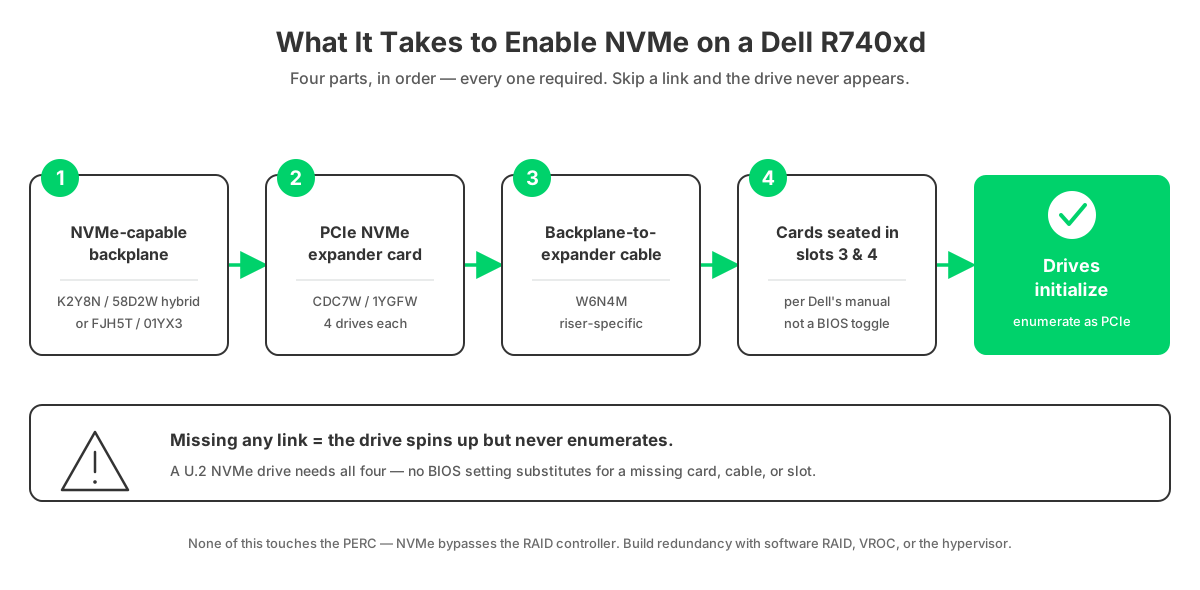
If your R740xd currently runs SAS/SATA and you want to add front NVMe, walk the chain:
- Backplane — confirm you have an NVMe-capable board (K2Y8N/58D2W hybrid for up to 12, or FJH5T/01YX3 for a full 24). A plain SAS/SATA backplane must be swapped.
- Expander card — a PCIe NVMe drive expander (Dell CDC7W, 1YGFW, or TJCNG for 4 drives each; the 235NK / W0DNK v2 cards drive up to 12). One 4-drive card per four NVMe drives.
- Cable — the piece people forget. The backplane-to-expander cable is riser-position specific: W6N4M and 7M5Y6 (Riser 1), 9TPCT (Riser 2), M2D68 / M89H1 (Riser 3), among others. If you have the CDC7W card but the drives still won't initialize, this missing or wrong cable is almost always the reason.
- Slots — for the 24-NVMe configuration, Dell requires the bridge cards in slots 3 and 4. Wrong slots, no enumeration.
Note what's not on that list: a RAID controller. NVMe never touches the PERC. Once the chain is complete, the drives appear to the OS as PCIe devices, and you build redundancy with software RAID, VROC where supported, or your hypervisor. If you'd rather not source the parts piecemeal, we can configure a Dell PowerEdge R740xd with the exact backplane, expander, and cable set already matched.
Rear and mid flex bays (R740xd only)
The R740xd's flex bays are how it gets past 24 front drives. A mid-drive tray sits above the fans (4×2.5" or 4×3.5"); a rear cage — the "flex bay" — mounts at the back of the chassis in place of, or alongside, PCIe risers. Each is its own backplane and cable, and each consumes airflow and PCIe/riser budget, so a heavily populated rear cage can limit your expansion cards. The plain R740 has neither; these are xd-only.
Common in-stock rear options: DJCPT, HN1H8, and WMJR0 for a 4-bay 2.5" rear cage; YWTC2 for a 2-bay 3.5" rear; and NR8HM for a 2-bay 2.5" rear that also carries a Riser 2 card and Riser 3 slot. Match the rear cage to the front form factor and to the risers you still need for controllers or NVMe expanders.
Which controller pairs with which backplane

The controller handles your SAS and SATA drives; it does not touch NVMe. For the R740 (14th gen), these are the options:
| Controller | Type | RAID modes | Handles NVMe? | Best fit |
|---|---|---|---|---|
| HBA330 | HBA (non-RAID, IT mode) | Pass-through / JBOD | No | ZFS, TrueNAS, Ceph, vSAN — software-defined storage that wants raw disks |
| PERC H330 | Entry RAID | 0/1/5/10 + pass-through | No | Boot volumes, light RAID, budget builds |
| PERC H730 / H730P | Mid RAID, 2 GB cache | 0/1/5/6/10/50/60 | No | General mixed SAS/SATA RAID |
| PERC H740P | High-end RAID, 8 GB cache | 0/1/5/6/10/50/60 | No | Large, heavily-used arrays |
| BOSS-S1 | M.2 boot card | RAID 1 mirror of 2× M.2 SATA | No | Dedicated OS boot — frees your front bays for data |
| PERC S140 | Software RAID (chipset) | 0/1/5/10 | SATA/NVMe (software) | Cheapest RAID, no hardware cache |
A few rules that save headaches. The BOSS-S1 mirrors two M.2 SATA drives purely for the operating system on its own card — use it and you keep all 24 front bays for data instead of burning two on the OS. The HBA330 is the right call when your storage stack (ZFS, vSAN, Ceph) wants direct disk access rather than hardware RAID. And the newer PERC H750 / H350 and HBA350i are 15th-generation controllers; they can be used in an R740xd with the right adapter cable, but Dell's own rule is that they cannot be mixed in the same system with the 14th-gen H730P, H740P, H330, or HBA330. Treat them as a newer, optional path, not the default R740 part. You can browse RAID controllers and HBAs by model.
The single most important thing to remember: NVMe bypasses the controller entirely. There is no hardware RAID across NVMe on the R740 or R740xd. If someone tells you their H740P is "managing" the NVMe bays, it isn't — those drives are wired straight to the CPU.
How to spec (or upgrade) it correctly
Work backward from the drives you want to run:
- All SATA or SAS, up to 16 drives — an R740 with the 8-bay (R3GPC) or 16-bay (9WGTD) SFF backplane and a PERC H730P or H740P. Add a BOSS-S1 for boot.
- 24 SAS/SATA drives, no NVMe — an R740xd with the 24-bay P1MJ3 backplane and an H740P (or an HBA330 if you're running software-defined storage).
- A mix: some fast NVMe plus bulk SAS/SATA — the R740xd 24-bay hybrid backplane (K2Y8N/58D2W), a PERC or HBA for the SAS/SATA drives, plus one PCIe expander card and cable per four NVMe drives, up to 12 NVMe at full bandwidth.
- Maximum NVMe density — the R740xd all-NVMe backplane (FJH5T/01YX3) with the two bridge cards in slots 3 and 4 for 24 NVMe; accept the shared-lane trade-off.
- Need more than 24 drives — add a mid tray and/or a rear flex bay on the R740xd, and check that the rear cage leaves you the risers you still need.
Every one of these is a combination we build and warranty. If you tell us the drives and the workload, we'll spec the backplane, controller, expander, and cabling as one matched set rather than leaving you to reconcile part numbers across sellers.
Frequently Asked Questions
- Which R740xd backplane supports NVMe, and how many drives?
- Two do. The 24-bay hybrid backplane (Dell K2Y8N / expansion board 58D2W) runs SAS, SATA, and up to 12 NVMe drives. The dedicated all-NVMe backplane (Dell FJH5T, also listed as FHJ5T, / expansion board 01YX3) runs all 24 bays as NVMe.
- Can I upgrade my existing SAS/SATA backplane to NVMe, or do I have to replace it?
- If you already have an NVMe-capable backplane (the K2Y8N/58D2W hybrid or the FJH5T/01YX3 all-NVMe board), you don't replace it — you add a PCIe expander card and the backplane-to-expander cable. A plain SAS/SATA-only backplane (P1MJ3) has no PCIe lanes and must be swapped.
- I have the CDC7W expander card but my NVMe drives still won't initialize — is it a cable problem?
- Almost always, yes. The CDC7W (or 1YGFW) card needs the backplane-to-expander cable — W6N4M or 7M5Y6 on Riser 1 — and the bridge cards must sit in slots 3 and 4. Card without the correct cable in the correct slot equals dead drives.
- What's the part number for the cable between the backplane and the expander card?
- It's riser-specific. Common ones: W6N4M and 7M5Y6 for Riser 1, 9TPCT for Riser 2, and M2D68 or M89H1 for Riser 3. Match the cable to the riser the expander card is installed in.
- Which backplane do I need to run SAS SSDs in a 24-bay R740xd?
- Any SAS-capable 24-bay SFF backplane (the P1MJ3, or the K2Y8N hybrid) paired with a SAS controller — a PERC H730P/H740P or an HBA330. SAS SSDs will not run on a SATA-only path even though the drives are the same 2.5" size.
- Will Dell EMC Samsung PM1643 SAS SSDs work in a 24-bay R740xd with an H740P?
- Yes. The PM1643 is a 12 Gb SAS SSD; on a SAS-capable 24-bay backplane with a PERC H740P it's fully supported. Just confirm the drive caddies match the 2.5" SFF backplane.
- Can I mix SATA SSDs and NVMe drives on the same backplane?
- Yes, on the hybrid backplane. The SATA drives run through the PERC while the NVMe drives run on the PCIe expander path. The one caveat is not to put SATA and NVMe drives in the same RAID virtual disk.
- Is there a BIOS setting I need to change to make NVMe initialize?
- The failure is almost always physical — a missing expander cable or cards in the wrong slots — not a BIOS toggle. Get the bridge cards into slots 3 and 4 with the correct cable, and the NVMe drives enumerate as PCIe devices. They will not appear in the PERC RAID BIOS, because NVMe bypasses the RAID controller.
- Can I run hardware RAID (an H740P) across the NVMe drives?
- No. On the R740 and R740xd, NVMe connects straight to the CPU's PCIe lanes and bypasses the PERC entirely. Use S140 software RAID, Intel VROC where supported, or your OS/hypervisor for NVMe redundancy. The H740P still hardware-RAIDs your SAS and SATA drives.
- Can I add a rear flex bay to a plain R740?
- No. Mid trays and rear flex bays are R740xd-only chassis features. On the standard R740 there's no mounting or backplane support for them.
- How many NVMe drives can each PCIe expander card support?
- On the direct-attach hybrid backplane, each 4-drive expander card (CDC7W, 1YGFW, TJCNG) drives four NVMe at a full x4 link — three cards for 12 drives. The dedicated all-NVMe board uses a different, multiplexed design where two bridge cards feed all 24, with shared lanes.
- Is the HBA350i an R740 controller?
- Not natively. The HBA350i is a 15th-generation controller (R650/R750/R760). The R740's HBA is the HBA330. Dell's rules prohibit mixing the newer H750/H350/HBA350i with the 14th-gen H730P/H740P/H330/HBA330 in the same system.
Once the backplane, controller, and cabling are settled, the drives are the easy part. Tell us the workload and we'll configure a Dell PowerEdge R740 or R740xd as one tested, warrantied build — or shop the backplanes directly if you're repairing or upgrading a chassis you already own.
Have Questions About This Topic?
Our team works with enterprise IT hardware daily. If this article raised questions about your specific environment, we are happy to help.
