


By Enterasource Posted on October 7, 2026
Read MoreDell PowerEdge R740 Buying Guide: End of Life, Specs and Configuration
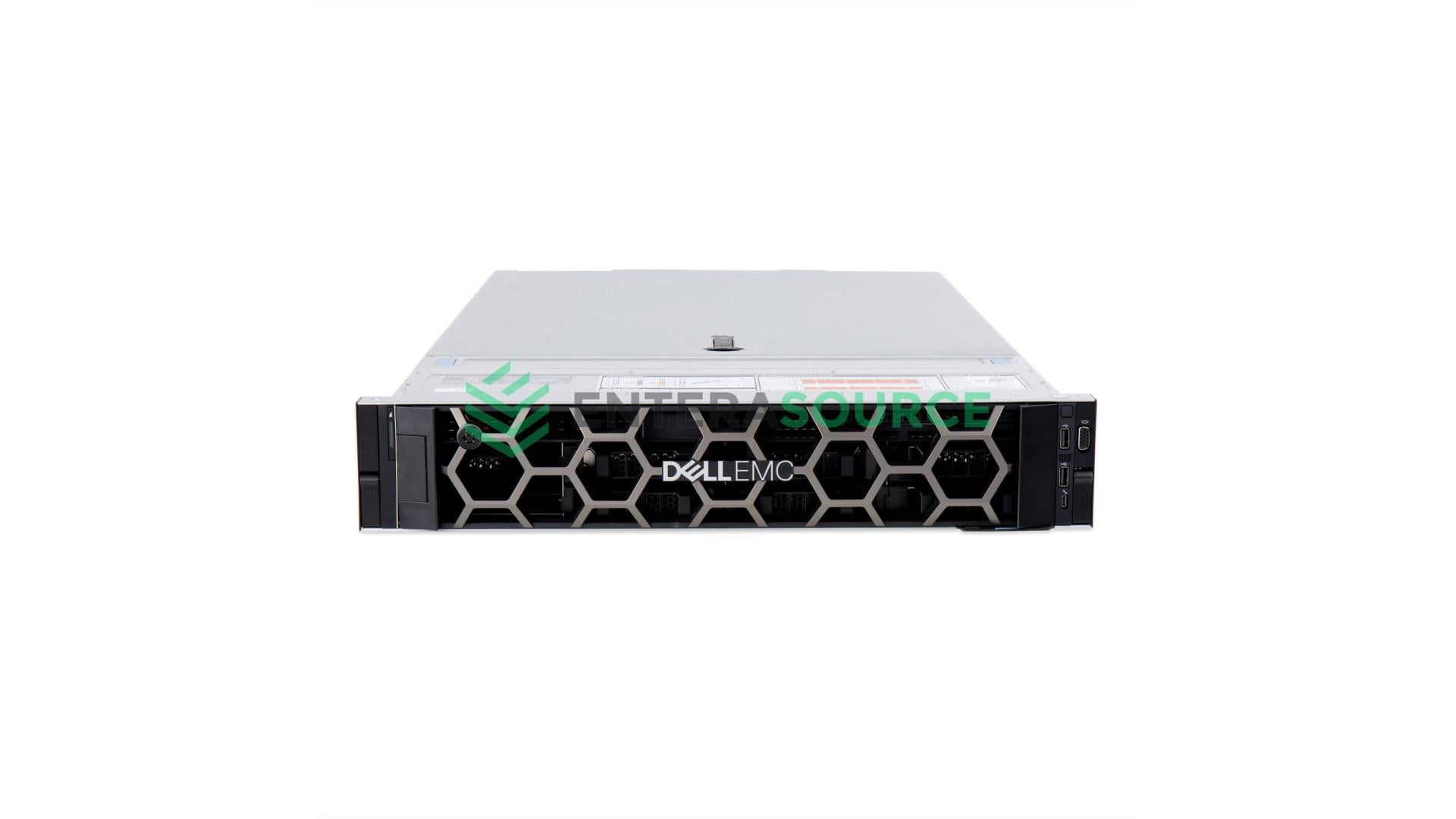
Search for the Dell PowerEdge R740's end of life and you will find a specific date, presented in a table: retired in Q4 2023, support running out on 31 December 2028. That date is not Dell's. Dell has never published a model-level end-of-life or end-of-support-life date for the PowerEdge R740, and said so again on 17 July 2026, replying to someone asking that exact question about this exact server: "Dell does not provide a publicly documented End of Life (EOL) or End of Support Life (EOSL) schedule for PowerEdge servers."
This guide is for anyone buying a used Dell R740: the platform's real lifecycle position, how to find the only date that applies to a specific machine, which processors and memory are worth paying for, and what to check before delivery. Where our configurator builds less than the platform supports, it says so.
Who the Dell PowerEdge R740 is for — and who should look elsewhere
The Dell R740 is a two-socket 2U server from Dell's 14th generation, built around 1st and 2nd Generation Intel Xeon Scalable processors and DDR4 memory. It suits virtualisation, file and application workloads where core count and memory capacity matter more than the newest instruction sets, and it is the 14th-generation platform most widely available refurbished.
Four readers should stop here:
- You need 1U density. The R740's 1U sibling is the R640 — same processor family, same memory rules. See the R640 buying guide or configure a Dell PowerEdge R640.
- You need more drives than a plain R740 holds. It tops out at 16 front bays with no rear or mid-bay storage. That is the R740xd's job, covered below.
- You need DDR5 or PCIe Gen4. A Dell employee named the successor in 2022: "Successor of R740 is R750." See the 16th-generation R760 buying guide or configure a Dell PowerEdge R750.
- You are buying for GPU work. Accelerator support here is narrower than the headline figure suggests, and it is not something we configure — see which Dell PowerEdge servers support GPUs.
Unsure which model fits? How to choose a Dell PowerEdge model and generation works through that from the top.
Is the Dell PowerEdge R740 end of life?
Dell has never published an end-of-life or end-of-support-life date for the PowerEdge R740. No Dell document assigns the model a retirement date, and Dell staff have said so repeatedly when asked — including on threads about this exact server.
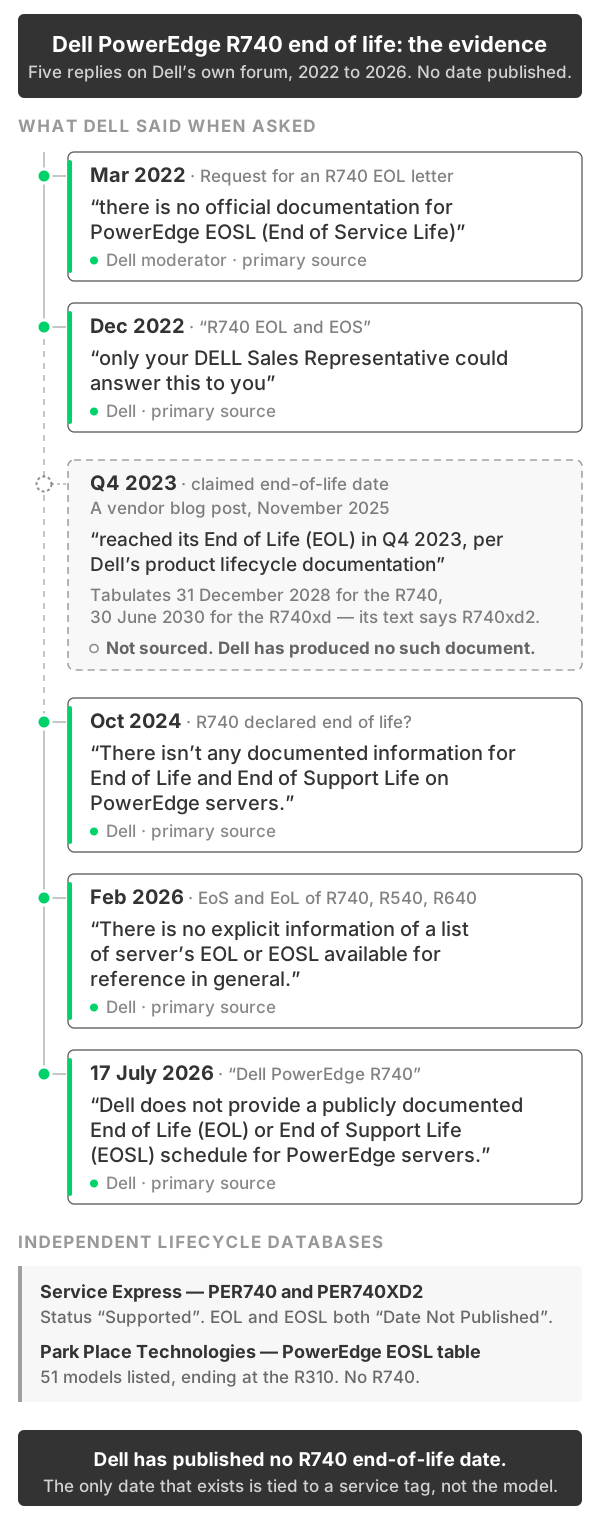
Where the "Q4 2023" Dell R740 end of life date came from
A vendor blog post published in November 2025 states that "The Dell PowerEdge R740 officially reached its End of Life (EOL) in Q4 2023, per Dell's product lifecycle documentation," and tabulates an end-of-support-life date of 31 December 2028 for the R740 and 30 June 2030 for the R740xd. There are three problems with it, all checkable.
First, the document it cites does not appear to exist. In March 2022 a customer asked Dell's forum for exactly that paperwork — "May i have a EOL letter for Dell PowerEdge R740 or replacement letter for Dell PowerEdge R750?" — and a Dell moderator replied that "there is no official documentation for PowerEdge EOSL (End of Service Life)." Two further customers asked for written confirmation that the R740 was discontinued, in December 2022 and June 2023. Neither received a document.
Second, the page contradicts itself. Its text assigns 30 June 2030 to the R740xd2; its own table assigns the same date to the R740xd. Dates taken from a document do not move between models from one paragraph to the next.
Third, the independent lifecycle databases decline to publish a date at all. Service Express lists PER740 as "Supported" with both EOL and EOSL "Date Not Published", and lists PER740XD2 the same way — directly contradicting the 2030 date. Park Place Technologies' PowerEdge table runs from the R905 to the R310 and does not contain the R740 at all.
| Source | What it says | When | Primary? |
|---|---|---|---|
| Dell Community — request for an R740 EOL letter | "there is no official documentation for PowerEdge EOSL (End of Service Life)" | Mar 2022 | Dell |
| Dell Community — "R740 EOL and EOS" | "only your DELL Sales Representative could answer this to you" | Dec 2022 | Dell |
| Dell Community — R740 declared end of life? | "There isn't any documented information for End of Life and End of Support Life on PowerEdge servers." | Oct 2024 | Dell |
| Dell Community — EoS and EoL of R740, R540, R640 | "There is no explicit information of a list of server's EOL or EOSL available for reference in general." | Feb 2026 | Dell |
| Dell Community — "Dell PowerEdge R740" | "Dell does not provide a publicly documented End of Life (EOL) or End of Support Life (EOSL) schedule for PowerEdge servers." | Jul 2026 | Dell |
| Service Express, PER740 | Status "Supported"; EOL and EOSL both "Date Not Published" | — | Third-party |
| Service Express, PER740XD2 | Status "Supported"; EOL and EOSL both "Date Not Published" | — | Third-party |
| Park Place Technologies, PowerEdge EOSL table | 51 models listed, ending at the R310. No R740. | — | Third-party |
| Vendor blog post | "reached its End of Life (EOL) in Q4 2023, per Dell's product lifecycle documentation" | Nov 2025 | Not sourced |
What Dell staff offer instead is a rule of thumb. Answering an R740 discontinuation query in December 2022, a Dell employee wrote that "There is no document announced or published for servers for EOL or EOSL. Usually, lifespan of a server is around 5-7 years," and Dell staff elsewhere tie that span to the warranty rather than the model. It is a forum rule of thumb, not a published specification.
One objection is worth answering directly. On a related PowerEdge lifecycle thread, a Dell employee later commented, "This is no longer relevant-changed the support site." In context that refers to the support site changing, not to Dell having started publishing lifecycle dates — and two later Dell replies, in February and July 2026, repeat the original position. The lookup below reflects the current site. The evidence frame for the PowerEdge range as a whole is in the full end-of-life evidence for Dell PowerEdge servers.
How to find the real end-of-service-life date for your Dell R740
There is a date that applies to an individual R740, tied to that machine's service tag rather than the model. Dell's instructions, given repeatedly on the forum, are:
- Go to Dell's support site and enter the server's service tag.
- Open the Service Event tab.
- Untick "Only show active events."
- The End of Service Life date is displayed, if one exists for that system.
Step three is the one that matters: the date sits behind a filter that hides it by default, which is why so many people conclude Dell publishes nothing at all.
Do this before you buy. Ask any seller for the service tag and run it yourself. If a machine is close to the end of its coverage and you need manufacturer support, that is a reason to walk away from that unit — the lookup is only useful if you will let it say no.
What changes when Dell support ends, and what doesn't
Third-party maintenance remains available. Both lifecycle databases above list the Dell R740 as currently supported, and third-party maintainers are why those databases exist — they sell support on hardware past the manufacturer's window.
Parts availability is the practical constraint, and it is healthier than the platform's age suggests. The R740 shipped in volume and the aftermarket reflects that. We stock roughly 160 individually listed R740 spare parts — backplanes, motherboards, risers, cables, power supplies, rail kits, bezels.
One thing catches people out. A Dell service contract is geographically bound: a contract purchased at point of sale "is valid only in the country or region in which the computer was purchased," and several contract types "are not always available for transfer outside of the region the coverage was purchased in." An imported Dell R740 may carry coverage that will not be honoured where you are. Ask which country the service tag was sold into. On the broader decision, new versus refurbished servers covers the general case.
The 15th-generation R750 sits in a different position — Dell publishes no model-level date for it at all; see the Dell PowerEdge R750 buying guide.
Dell R740, R740xd or R740xd2 — which one you actually need
The R740xd buys drive capacity without giving up compute. The R740xd2 buys drive density by giving up a great deal of it.
The R740 and R740xd are the same compute platform — identical processor support, memory rules, power and management. What separates them is storage plumbing. Dell is blunt about the R740's limit, "No rear or mid-bay storage options," while the Dell R740xd adds both. Which backplane suits which drive type is covered in the R740 and R740xd backplane and storage configuration guide.
The Dell R740xd2 is a different machine wearing a similar name. Per Dell's technical guide for it, the xd2 caps processors at 22 cores and 140 W against the R740's 28 and 205 W, drops from 24 DIMM slots to 16, supports RDIMM only, falls from eight PCIe Gen 3 slots to five, and carries no accelerator specification at all — the 34-page xd2 guide has no GPU or FPGA section. Dell lists 11 supported processors for it against 111 for the R740. In exchange the front bays go to 24 × 3.5-inch, a maximum of 384 TB.
Its memory arrangement is asymmetric in a way that is easy to miss: Dell's service manual states "Processor 1 supports up to 10 memory sockets and Processor 2 supports up to 6 memory sockets." The two sockets cannot be populated identically — the arrangement Dell recommends everywhere else.
Choose the xd2 only when raw 3.5-inch capacity is the point and compute is incidental. It is configured on the R740xd build page — select the R740xd2 24-bay 3.5-inch chassis. Our configurator exposes its 3.5-inch drives through the midplane group rather than the front-bay group; the capacity above is Dell's platform specification.
Dell R740 specifications
Every row is from Dell's PowerEdge R740 and R740xd Technical Guide, Rev. A09.
| Specification | R740 | R740xd |
|---|---|---|
| Processors | Up to two Intel Xeon Scalable, 1st or 2nd Generation, up to 28 cores each | |
| Memory | 24 DDR4 slots — 12 per processor, six channels, two per channel. Up to 3 TB, up to 2933 MT/s — conditions below | |
| Front drive bays | Up to 16 × 2.5-inch (max 122.88 TB) or 8 × 3.5-inch (max 128 TB) | Up to 24 × 2.5-inch (max 184 TB) or 12 × 3.5-inch (max 192 TB) |
| Mid and rear bays | None | Mid: up to 4 × 3.5-inch (64 TB). Rear: up to 4 × 2.5-inch or 2 × 3.5-inch |
| PCIe | Up to 8 PCIe Gen 3 slots, maximum of four x16 | |
| Accelerators | Up to three 300 W or six 150 W GPUs | Same, but only on the 24 × 2.5-inch chassis |
| Storage controllers | PERC H330, H350, H730P, H740P, H750, HBA330, HBA350i, S140 | As R740 except H330 and H350, which Dell marks R740-only |
| Dimensions and weight | 86.8 × 434.0 × 737.5 mm (Table 3, excluding bezel) · up to 28.6 kg (R740), 33.1 kg (R740xd) | |
Power supplies run from 495 W to 2400 W on the platform; our configurator offers 750 W, 1100 W, 1600 W and 2000 W. Sizing one properly is covered in Dell R740 power consumption and PSU sizing.
Which Xeon Scalable processors are worth paying for in a used Dell R740
In a two-socket R740, the processor tier tells you less than the individual part number does. Dell's supported-processor table lists 111 parts, and reading it closely changes what you should shop for.
First, a point of confusion: Dell's headline specification table names only 2nd Generation Xeon Scalable processors, but the supported-processor table in the same document lists 1st Generation Skylake-SP parts too. The Dell R740 takes both generations. Our configurator reflects that — of its 124 processor options, 55 are 1st Generation and 69 are 2nd Generation, spanning 4 to 28 cores.
| Processor | Cores | Base clock | Cache | Max memory speed | TDP |
|---|---|---|---|---|---|
| Xeon Gold 6258R | 28 | 2.7 GHz | 38.5 MB | 2933 MT/s | 205 W |
| Xeon Platinum 8280 | 28 | 2.7 GHz | 38.5 MB | 2933 MT/s | 205 W |
| Xeon Gold 6238R | 28 | 2.2 GHz | 38.5 MB | 2933 MT/s | 165 W |
| Xeon Platinum 8180 (1st Gen) | 28 | 2.5 GHz | 38.5 MB | 2667 MT/s | 205 W |
On Dell's table the Gold 6258R and the Platinum 8280 differ in nothing but the tier badge. What separates the Gold 6200 and Platinum 8200 lines generally is multi-socket scalability, which a two-socket server cannot use either way. And the 1st Generation flagship, the Platinum 8180, is the weaker part here: same core count, lower memory speed.
Second, the "R" refresh parts. Across the Gold 6200 family each R part adds cores and clock at the cost of TDP: the 6248R is 24 cores at 3.0 GHz against the 6248's 20 at 2.5, and the 6238R is 28 cores against the 6238's 22.
That pattern does not hold further down the range. In the Silver 4200 and Bronze 3200 families the refresh lowered supported memory speed — the Silver 4210, 4214 and 4215 support 2667 MT/s, the 4210R, 4214R and 4215R only 2400. In a Silver-tier Dell R740 the R part is not automatically the better one.
The practical rule: look up the specific processor's maximum memory speed before buying memory for it. No 1st Generation part exceeds 2667 MT/s, and among 2nd Generation parts it varies by SKU — the Gold 5218R stops at 2667 and the 6222V at 2400 despite its 6200-series number. Of Dell's 111 supported parts, 47 reach 2933, 47 stop at 2667, 15 stop at 2400 and two at 2133.
Dell R740 memory rules that change what you should buy
The R740's headline memory figures — 3 TB and 2933 MT/s — are both correct, and they cannot both be true in the same machine.
The layout is twelve DIMM slots per processor, arranged as six channels with two slots each. Dell's guidance is to populate "all memory channels… with the same number of DIMMs, either 6 or 12 DIMMs per CPU." Three rules then interact:
- Reaching 3 TB requires 128 GB octa-rank LRDIMMs — and LRDIMM runs at 2666 MT/s on both processor generations.
- Filling both slots on a channel drops everything to 2666 MT/s. Dell's supported-memory table gives 16, 32 and 64 GB RDIMMs as "2933 MT/s – 2666 MT/s" for one and two DIMMs per channel respectively.
- 8 GB RDIMMs are single-rank and run at 2666 MT/s regardless, even on a 2933-capable processor at one DIMM per channel. The cheapest module in the range quietly caps the whole system.
Put together: 2933 MT/s requires a processor that supports it, dual-rank 16, 32 or 64 GB RDIMMs, and one DIMM per channel. The largest configuration meeting all three is 24 × 64 GB — 1536 GB. That is the most memory a Dell R740 can hold while running at 2933 MT/s. Going to 3 TB means accepting 2666.
Which way to go is a workload question: bandwidth-sensitive work prefers 1536 GB at 2933, capacity-bound work prefers 3 TB at 2666.
One thing to be clear about: the 3 TB ceiling is Dell's platform specification, reached with LRDIMMs. Our configurator offers DDR4 RDIMM only, in 8, 16, 32 and 64 GB, so the largest build we ship is 24 × 64 GB — 1536 GB, exactly the fastest supported arrangement. If you need 3 TB you are sourcing LRDIMMs elsewhere. Browse DDR4 server memory and Intel server processors separately.
What to check before you buy a used Dell R740
The checks that decide whether a machine is worth taking, in the order we run them on our receiving floor.
- Run the service tag before you commit. Service Event tab, "Only show active events" unticked. That gives the coverage position of the unit, not the model.
- Ask which country the service tag was sold into. Dell's contract terms are geographically bound; an imported machine can arrive with coverage that will not be honoured locally.
- Read the processor part number, not the tier, and look up its maximum memory speed before buying DIMMs for it.
- Count populated DIMM slots per processor and check the two match. Unequal population forfeits Dell's best-practice arrangement, and two DIMMs per channel costs the 2933 MT/s tier.
- Check DIMM rank as well as capacity. A machine advertised as "192 GB" built from 24 × 8 GB single-rank modules runs slower than one built from 12 × 16 GB dual-rank, and has no slots left.
- Identify the RAID controller by model. H730P and H740P differ in cache size; the HBA330 is not a RAID controller at all. Dell marks the H330 and H350 as R740-only.
- Confirm the riser configuration matches your plan. Only two of the configurations Dell publishes support a single processor, and both are x8-only — so a single-processor Dell R740 has no x16 slot available. Only three permit rear storage on the R740xd, and none of those reaches all eight PCIe slots.
- Check the iDRAC licence tier — Express, Enterprise or Datacenter. Transfer between servers has its own rules, covered in the R640 buying guide.
- If you boot from internal SD, confirm the IDSDM module and its micro-SD cards are present. This boot path is a 14th-generation feature, not a given on a used chassis.
- Confirm the second processor's heatsink and matching air shroud are fitted. We see dual-socket machines arrive with a second processor and no heatsink, or with the single-processor shroud still in place. Neither is a running second socket.
- Check the TPM state, and confirm rails, bezel and caddies are included. A TPM still owned by a previous deployment is a re-provisioning problem; the rest are separate line items, not assumptions.
- Match the chassis to the backplane before anything else. This is the check that most often invalidates a purchase: the R740 and R740xd backplane and storage configuration guide.
Frequently Asked Questions
- Did Dell declare the PowerEdge R740 end of life in 2023?
- No. Dell has never published a model-level end-of-life or end-of-support-life date for the PowerEdge R740, and has said so repeatedly — most recently that "Dell does not provide a publicly documented End of Life (EOL) or End of Support Life (EOSL) schedule for PowerEdge servers." Service Express lists part number PER740 as Supported, with EOL and EOSL both "Date Not Published."
- Where do the "December 31, 2028" and "June 30, 2030" R740 end-of-support dates come from?
- From a single vendor blog post, not from Dell. It attributes the Q4 2023 end-of-life claim to "Dell's product lifecycle documentation," but when a customer asked Dell for an R740 end-of-life letter in March 2022, Dell replied there is no official documentation for PowerEdge end of service life. The page also assigns 30 June 2030 to the R740xd2 in its text and to the R740xd in its own table.
- What replaced the Dell PowerEdge R740?
- The PowerEdge R750. A Dell employee stated it directly on Dell's support forum in July 2022: "Successor of R740 is R750. It is the latest server in that category." The R750 moved to 3rd Generation Intel Xeon Scalable processors while staying on DDR4; the 16th-generation R760 moved to DDR5.
- Does the Dell PowerEdge R740 support 1st Generation Intel Xeon Scalable processors?
- Yes. Dell's headline specification table names only the 2nd Generation, but the supported-processor table in the same Technical Guide lists 1st Generation Skylake-SP parts including the Platinum 8180 and Gold 6154. Of our 124 R740 processor options, 55 are 1st Generation and 69 are 2nd.
- What is the maximum memory speed of a Dell PowerEdge R740?
- 2933 MT/s, but only if three things are true at once: a processor that supports it, dual-rank 16, 32 or 64 GB RDIMMs, and no more than one DIMM per channel. Maximum memory speed is a per-processor-SKU property — of the 111 processors Dell lists for the R740, 47 support 2933 MT/s, 47 stop at 2667 and 15 stop at 2400. No 1st Generation part exceeds 2667 MT/s.
- Can a Dell PowerEdge R740 really hold 3 TB of RAM?
- Yes, but not at full speed. Dell's 3 TB figure requires 24 × 128 GB octa-rank LRDIMMs, and LRDIMM runs at 2666 MT/s. Two DIMMs per channel also caps every module at 2666. The largest configuration running at 2933 MT/s is 24 × 64 GB dual-rank RDIMM — 1536 GB. You can have 3 TB or 2933 MT/s, not both.
- Is the Intel Xeon Gold 6258R the same as the Platinum 8280 in an R740?
- On every column Dell publishes in its R740 supported-processor table, yes — both are 28-core parts at 2.7 GHz with 38.5 MB of cache, 2933 MT/s memory support and a 205 W TDP. What separates the Gold 6200 and Platinum 8200 lines generally is multi-socket scalability, which a two-socket R740 cannot use either way. The Gold 6238R matches the Platinum 8276 the same way at 165 W.
- How many DIMM slots does the Dell PowerEdge R740xd2 have?
- Sixteen, and they are not split evenly. Dell's Installation and Service Manual states that "Processor 1 supports up to 10 memory sockets and Processor 2 supports up to 6 memory sockets," with six channels per processor. The R740 and R740xd have 24 slots, twelve per processor, which is why the xd2 cannot be populated symmetrically.
- How many processor cores does the Dell PowerEdge R740xd2 support?
- Up to 22 per socket, against 28 on the R740 and R740xd. Dell's R740xd2 Technical Guide also caps processor TDP at 140 W, which is what produces the core limit — every 28-core processor in Dell's R740 list is a 165 W or 205 W part. Dell lists 11 supported processors for the R740xd2 and 111 for the R740.
- How many PCIe slots does a Dell PowerEdge R740 have, and can a single-processor machine take a double-width card?
- Up to eight PCIe Gen 3 slots, with a maximum of four x16 — but only on a two-processor machine. Of the riser configurations Dell publishes, only two support a single processor, and both provide x8 slots only, so a single-processor Dell R740 has no x16 slot available in any supported configuration. Riser choice also trades against rear storage on the R740xd: the configurations that allow it do not reach all eight slots.
Where to go from here
Get the service tag of the machine you are considering and run the Service Event lookup first. It is the only lifecycle answer that applies to the server you would own, and worth acting on in both directions — a unit close to its coverage end is a reason to ask for a different one.
Once you know what you are specifying, configure a refurbished Dell PowerEdge R740, or start from the R740xd build page for mid and rear bays or the 24-bay 3.5-inch chassis. Both sit in our wider Dell PowerEdge range.
Have Questions About This Topic?
Our team works with enterprise IT hardware daily. If this article raised questions about your specific environment, we are happy to help.
